
Adafruit PiCowbell DVI Output for Pico - Works with HDMI Display
100 units available with a short lead time.
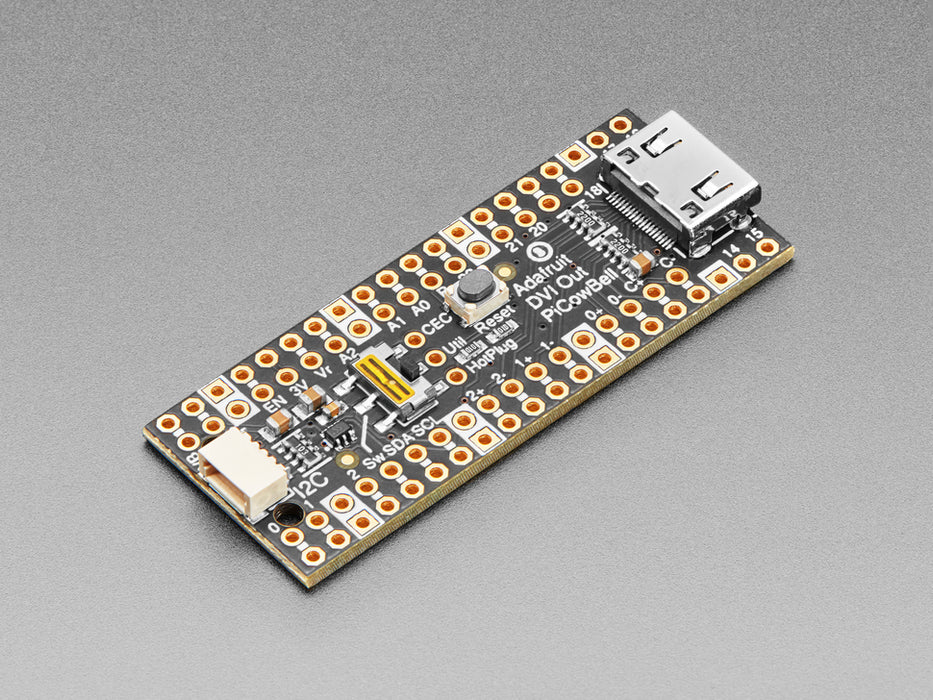
The Adafruit PiCowbell DVI Output for Pico lets you drive an HDMI monitor or television directly from a Raspberry Pi Pico or Pico W. It features a mini HDMI connector and outputs DVI-compatible digital video — just plug in a standard mini-HDMI-to-HDMI cable and start displaying graphics. Note that this board outputs video only, not audio.
In Arduino (recommended), the board uses the PicoDVI library to create a 320×240 or 400×240 pixel framebuffer that is pixel-doubled to 640×480 or 800×480 output. The library subclasses AdafruitGFX, so it's familiar if you've used Adafruit TFT or OLED displays. CircuitPython also supports DVI output, though memory constraints may limit you to monochrome display on Pico W with WiFi enabled.
Key Features
- Mini HDMI Connector – DVI output to any HDMI-compatible display or monitor
- STEMMA QT / Qwiic Connector – Right-angle JST SH for I2C devices on GPIO 4 (SDA) and GPIO 5 (SCL), also level-shifted to the HDMI connector for reading display EDID data
- Reset Button – Conveniently placed for quick program restarts
- Slide Switch – Connected to GPIO 3 for user-defined functions
- HDMI Extras Breakout – Pads for Utility, CEC, and Hot Plug Detect pins
- Gold-Plated Pads – Duplicate hole pads next to each pin for solder-jumpering; ground pads marked with white silkscreen
DVI Pin Mapping
- GPIO 6/7 – D2+/D2−
- GPIO 8/9 – D1+/D1−
- GPIO 10/11 – D0+/D0−
- GPIO 12/13 – Clock+/Clock−
Header Options
Ships with an assembled PCB and header that requires soldering. Several configurations are available:
- Stacking Headers – Plug into a breadboard or other accessories with sockets
- Socket Headers – Plug the Pico directly in for a solid, compact connection
- Short Socket Headers – Ultra-slim pluggable design; pair with Short Plug Headers on the Pico for a skinny sandwich
- Direct Soldering – Most compact and inexpensive, but permanent
Ideal For
- Microcontroller-driven HDMI displays and dashboards
- Retro gaming and graphics projects with Pico
- Digital signage and information displays
- Prototyping video output without a full single-board computer
Package Contents
- 1× Adafruit PiCowbell DVI Output PCB (assembled with mini HDMI connector)
- 1× Header (requires soldering)
Resources
The Adafruit PiCowbell DVI Output for Pico - Works with HDMI Display appears in the following collections: