

This product is no longer available
We no longer stock Adafruit USB Power Gauge Mini-Kit, but here are current alternatives in DIY Project Kits.
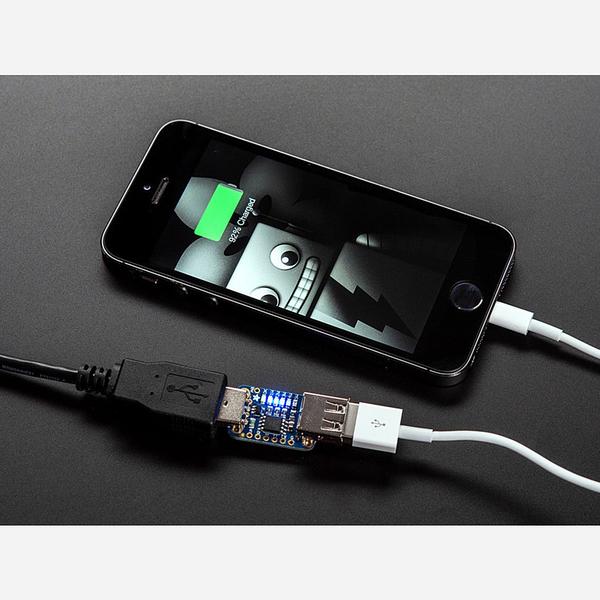
Adafruit USB Power Gauge Mini-Kit
Discontinued
The Adafruit USB Power Gauge Mini-Kit is an inline USB power monitor that shows you how much current and voltage your USB devices are drawing — no multimeter or cable splicing required. Simply plug it between your USB port and device for an instant visual readout via the on-board LED bar.
Built around an INA169 high-side current sensor and ATtiny85 microcontroller, data passes through transparently at any USB speed. The blue LED bar lights up one LED per watt of power draw, while a green LED monitors bus voltage and turns off if it drops below 4.5V — a quick indicator of power issues.
Key Features
- Visual Power Display – Blue LED bar shows power draw (one LED per watt, with PWM dimming for finer resolution)
- Voltage Monitor – Green LED stays lit while bus voltage is above 4.5V
- Current Range – Measures up to 1A (safe for devices drawing up to 2A — LEDs will max out)
- TTL Serial Output – Outputs voltage, current, and wattage as readable text at 9600 baud on the TX pin
- Transparent Pass-Through – Works with any USB device at any speed without interference
- 0.1Ω Current Sense Resistor – INA169 high-side current sensor tracked by ATtiny85
- Reprogrammable – ATtiny85 can be reprogrammed for custom behaviour
- Open Source – Hardware and firmware freely available
Ideal For
- Checking phone and tablet charge rates
- Testing USB battery chargers and power banks
- Monitoring USB-powered projects
- Datalogging USB power consumption via serial output
Package Contents
- 1× Assembled and tested PCB
- 1× USB Type-A jack (requires soldering)
- 1× USB Type-A plug (requires soldering)
