

Adding Items to an Existing Order
Forgot something? As long as your order has not shipped, you can add extra items to it yourself — even if you have already paid, by card, PayPal, bank transfer or purchase order. There is no coupon code to enter, you will not be charged shipping a second time, and if the additions cost more you simply pay the difference on a secure payment page.
Which Orders Can Take More Items?
Any order that has not left our warehouse, whatever way you paid:
- Card orders that have already been charged. The usual case when everything was in stock. Add the items, then pay just the difference online straight away.
- Orders paid with PayPal. Add the items, then pay the difference with PayPal straight away — the payment page shows a PayPal button for it.
- Orders with supplier-sourced items. These are authorised on your card at checkout rather than charged, and we only take the money when we ship. If the new total is more than the authorisation covers, we ask you to authorise the difference — still nothing is charged until your order ships.
- Purchase order and bank transfer orders. The new total simply appears on the updated invoice.
The quickest way to tell: open the order on your Orders page and look for the Add Items button. If it is there, you are good to go. It only disappears once part of your order has shipped, or while our team has the order open to pack or edit it — see below.
Option 1: Start From the Order
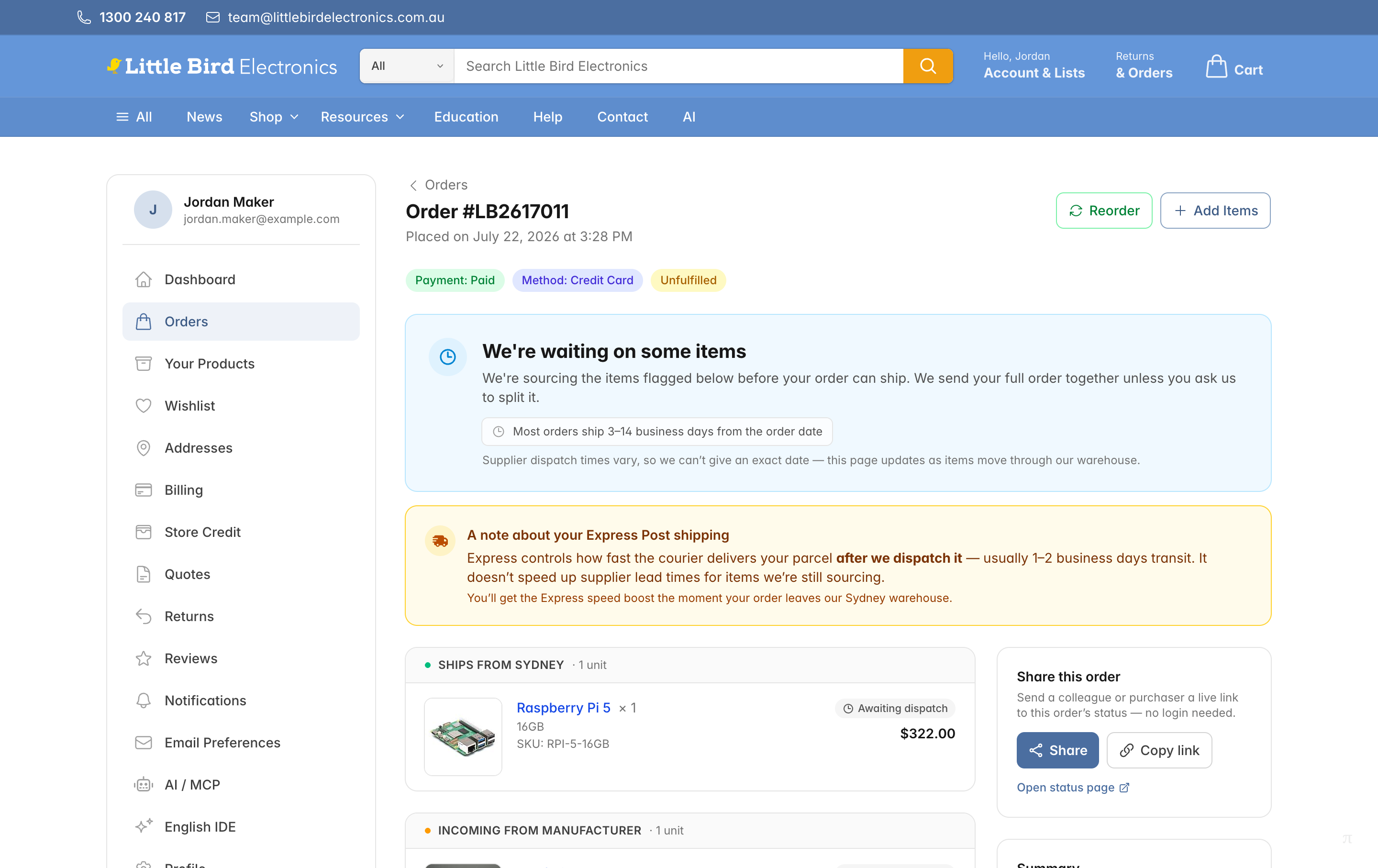
- Sign in and go to your Orders page.
- Click the order you want to add to, then click the Add Items button at the top. It is there even when the order shows Payment: Paid.
- You will be taken back to the store. Shop as usual — your cart shows a banner naming the order the items are headed for, so you can check you are on the right one.

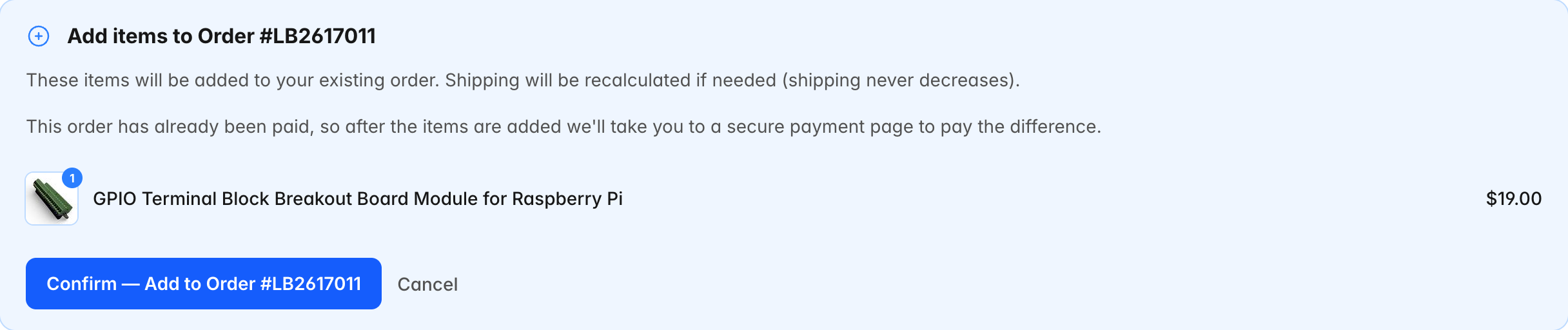
- From the cart, continue to checkout and click Confirm — Add to Order. If the order was already paid, the panel says so and tells you a payment page is next.
Option 2: Start From Your Cart
If you have already filled your cart, you do not need to go back and start again. Head to checkout while signed in. If you have an unshipped order, an Add to an existing order? panel appears listing it. Click Add to this order and your cart is appended to that order instead of becoming a new one.

Orders that are already partly shipped, and orders someone on our team currently has open, are not offered in that panel. If the order you want is missing from the list, get in touch.
Paying the Difference
Nothing is charged at the moment you add the items — what happens next depends on how the order was paid:
- Card already charged: you are taken straight to a secure payment page showing the new total, what you have already paid, and the difference due now. Pay it there and the order is squared up on the spot.
- Paid with PayPal: the same page shows a PayPal button for the difference. Approve it in PayPal's window and the order is squared up on the spot. Now and then PayPal takes a little longer to clear a payment — your order page shows it as processing until it does, and there's nothing more you need to do.
- Card authorised but not yet charged (supplier-sourced items): the same page takes a further authorisation for the difference instead. Everything is charged together when your order ships.
- Purchase order / bank transfer: no payment page — the difference is added to your invoice, and our bank details plus the payment reference are shown on the order.
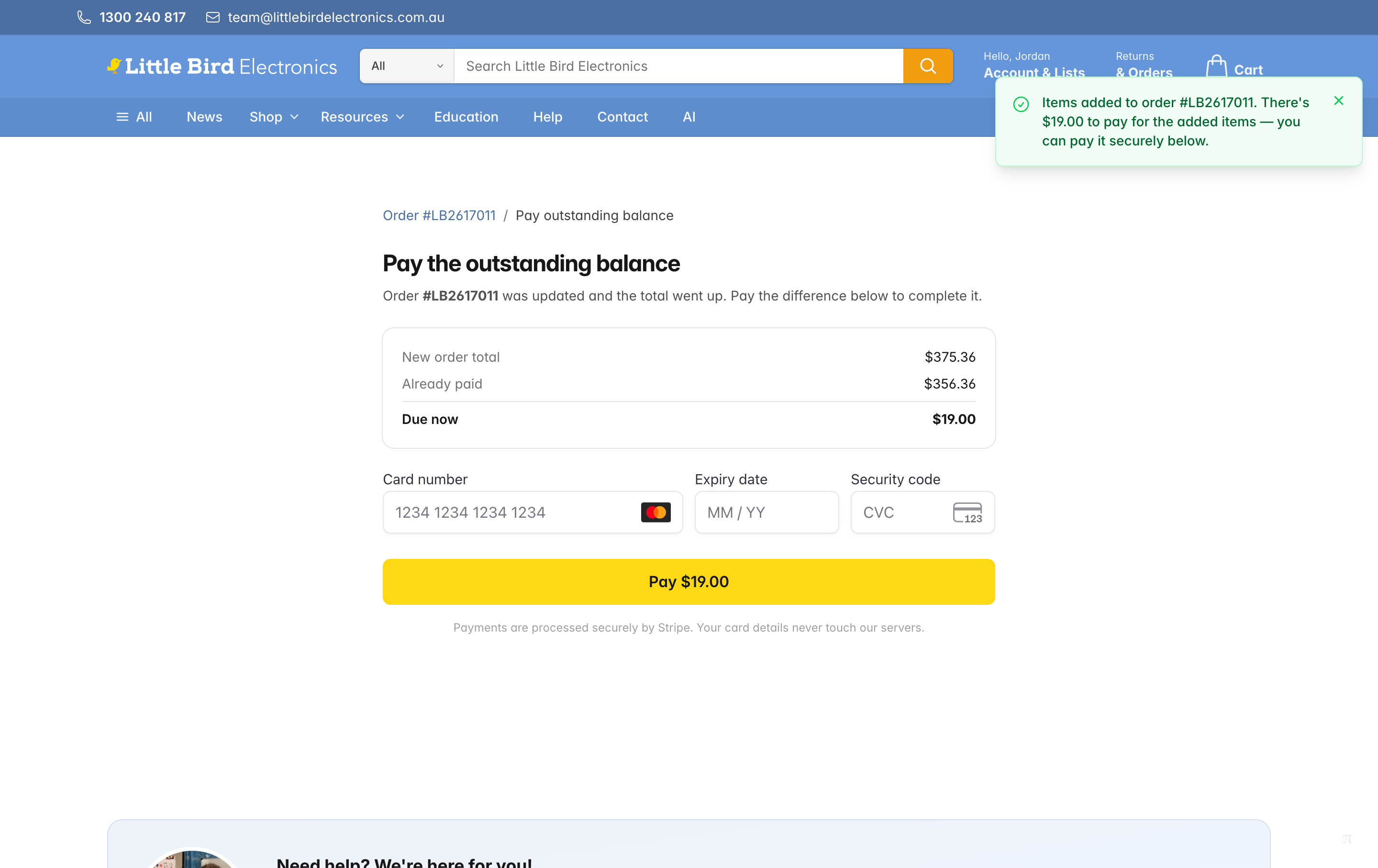
Not ready to pay right then? No problem — the order page shows the balance with a Pay now button whenever you come back, and we also email you a secure payment link.

A limit on PayPal orders: there is a cap on how much we can take through PayPal on one order. If the items you add would take a PayPal order past it, you will be told when you confirm the addition, and nothing is added — check those items out as a separate order instead, or get in touch and we will add them for you.
What Happens to Shipping
- You are never charged shipping twice. The order keeps its single shipping charge.
- We re-quote shipping on the bigger order. If the extra items push it into a larger or heavier parcel, the shipping line can go up — but it never goes down, and it is never doubled.
When the Add Items Button Is Not There
The button only appears while an order can still safely take more items. It disappears when:
- The order has shipped — including a part shipment. Once any of it is on its way, the remainder can no longer be changed online.
- Someone on our team currently has the order open to prepare or edit it.
- A PayPal payment for the order is still being processed. The button comes back as soon as PayPal clears it.
- The order has been cancelled or closed.
Missed the window? Reply to your order confirmation email and tell us what you would like to add. Right up until your order is packed we can usually add the items for you and settle the difference — and you still will not pay shipping twice.
Do I Need a Coupon Code?
No. Adding items to an existing order on littlebirdelectronics.com.au is built in and free — there is nothing to type in at checkout. (You may have seen a code such as ADD-TO-EXISTING-ORDER mentioned in an older email; that applies to orders placed on our Pi Australia store, which does not have this feature.)
Already Placed a Second Order?
If the extra items are already sitting on their own order, you may be able to merge the two orders instead. Merging needs both orders to be unpaid and unshipped. If that is not an option, reply to your order confirmation email with both order numbers and we will combine them before they ship.
Not Signed In?
Adding items requires you to be signed in, because we need to be sure the order is yours. If you checked out as a guest, you can still get access: go to sign in, choose Forgot password, and use the same email address you put on the order. Your past orders link up automatically.
