

Compose a tiny tune
Store an original melody as lists of pitches and note lengths, then play it once for each button press.
Step 1 — Predict a melody from two lists
A melody needs pitch and rhythm. This lesson uses a short original phrase, with a deliberate rest in the middle. You will learn to pair two arrays, step through them, and leave space between notes.
Look at notes and lengths. Which note should last longest? Which entry should be silent?
Before you begin
Before running: arrays start at index 0. notes[i] and lengths[i] form a pair. A loop increments i after its body; return exits a function. newPress returns true once for an accepted press.
Your goal: Index arrays safely over time. Show this with a prediction, a tested change and an explanation using the program’s names.
Retrieve one idea: what input, state or output did you change in the previous project?
Need a reminder? Turn the dial to bend a note.
Step 2 — Use the onboard instrument
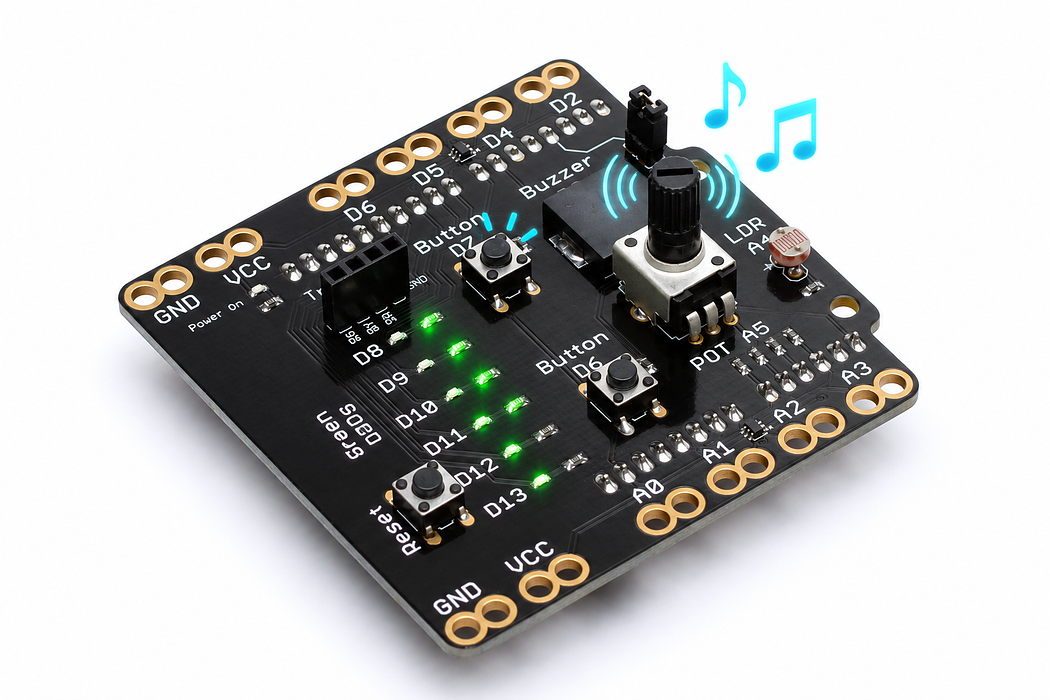
The sounder is on D3 and its jumper must be fitted. D7 starts the tune. No external wiring or music library is required. The complete frequency and duration lists are included in the sketch.
Step 3 — Program the shield
Choose Arduino Uno, then Verify and Upload the supplied sketch. The English instructions describe the same behaviour as the C++ beside them. Keep the USB cable connected while you test.
Step 4 — Play once, then try holding the button
Tap D7. Listen for four notes, a short rest, and four more notes ending on a longer low note. A long button hold should still play only one phrase. Release and press again to replay it.
The tune deliberately ignores presses while it is already playing. A new press after it finishes starts a new performance.
Step 5 — Explain matching indexes and musical gaps
The value at index 0 in notes is paired with index 0 in lengths. The same rule applies to every later index. NOTE_COUNT comes from the array size, so the loop knows when to stop.
A note sounds for 85 percent of its time slot. The remaining 15 percent separates it from the next note. The zero-frequency entry creates a full rest without asking tone to play zero hertz.
Read this part of the actual starter
void loop() {
  const unsigned long now = millis();
  const bool pressed = newPress(now);
  if (pressed && !playing) {
    playing = true;
    noteIndex = 0;
    startNote(now);
  }
  if (playing && now - noteStartedAt >= lengths[noteIndex]) {
    ++noteIndex;
    if (noteIndex >= NOTE_COUNT) {
      playing = false;
      noTone(BUZZER_PIN);
    } else {
notes[] and lengths[] are paired arrays; zero represents a rest. noteIndex selects corresponding elements. sizeof(notes)/sizeof(notes[0]) counts elements. startNote sets the timestamp; the loop advances only once the note duration has elapsed.
Work through one case
Index 0 selects 262 Hz and 180 ms. Tone lasts 180 × 85 / 100 = 153 ms, leaving 27 ms articulation. At index 4 the note is zero, so the program waits through a rest.
Your turn: complete the trace
Index 0 selects 262 Hz for 180 ms; index 4 selects ___ and therefore plays a ___.
Compare your trace after trying
0 Hz; rest.
If your answer differs
Trace the boundary test before looking up another array entry.
Step 6 — Compose your own answer phrase
Change the second frequency from 330 to 349 and listen to that one difference. Next, lengthen the rest from 120 to 300 milliseconds. Finally, add a note and its matching duration to both lists.
Use these approximate frequencies as a palette: C=262, D=294, E=330, F=349, G=392, A=440, B=494 and the next C=523 hertz. Write a new short phrase of your own instead of copying a recorded song.
Run a controlled experiment
Compose five entries including a rest. Keep both arrays the same length and trace the last index to prove the code stops before reading past the end.
- Save a copy of the working starter. Reset the board so stored state begins from the declared values.
- Write the expected result before editing. Change only the named factor; keep wiring and other settings fixed.
- Edit the C++ in the editor, Verify, then Upload to the connected Uno. The starter simulation does not execute your edited C++.
- Repeat the same input sequence. Record input, expected output, observed output and an explanation. Use labelled serial values where the sketch provides them.
- If the result differs, inspect the relevant condition and pin before changing another factor. Restore and upload the saved starter to recover.
Core task: explain one changed case. Optional extension: choose a boundary or timing case and justify the extra test. Use a paper trace or annotated screenshot when physical manipulation is inaccessible; distinguish predictions from measurements.
Step 7 — Check the composition
Explain why changing a frequency changes pitch while changing its matching duration changes rhythm. Demonstrate a rest and a long final note.
- “Match every note with a length”: the two arrays have different numbers of entries. Add or remove the missing partner.
- There is silence throughout: check the jumper and use D7.
- One note disappears: a zero is a rest; an extremely short duration may be hard to hear.
Independent check — try before revealing
The final note starts at 2000 ms and lasts 420 ms. At 2420 ms, what prevents an out-of-range next note?
Hint
Trace the boundary test before looking up another array entry.
Reasoning and feedback
The code increments noteIndex, tests it against NOTE_COUNT, sets playing false and stops tone instead of calling startNote again.
Arrays start at zero. The final valid index is NOTE_COUNT minus one. Study the array bridge and debounce helper before changing playback.
If your explanation missed a condition or stored value, add that column to your trace and try a new input. A working upload alone does not answer this check.
Step 8 — One press can start a whole tune
A newly accepted D7 press sets playing, resets noteIndex, and starts the first note.
Choose Cutaway. Move Button travel from released to fully pressed, hold it there, then release it. Watch the spring dome meet and leave the contact. Compare the D7 state and voltage at each point; on this shield a pressed button reads HIGH.
Predict and explain: Must the physical contact stay closed for the melody to reach its last note?
Check your explanation
No. The stored playing state and the elapsed-time checks advance the melody after the initial press. The momentary switch supplies the starting event; it does not hold the notes in memory. The switch is momentary: its contact opens on release. Any remembered output belongs to the program. The cutaway shows a clean contact transition; real switches may bounce, which is why some sketches debounce their input.
Step 9 — Inside the instrument that plays the melody
Each entry in notes[] supplies a frequency; lengths[] controls the matching duration. A zero note is a rest.
Choose Cutaway and press Play animation. Compare 440 Hz and 880 Hz using Change the pitch; use Tone off to enable the optional sound. The visible bending is slowed and enlarged. Pause, then drag Inspect one cycle through rising, steady and falling voltage.
Predict and explain: How is a rest different from a low-pitched note inside this component?
Check your explanation
A rest supplies no repeating tone drive. A low note still drives repeated bending, just at a lower frequency. The note list changes pitch and the length list schedules time; neither changes the sounder’s construction. Changing voltage bends the bonded ceramic and brass diaphragm. Charge moves onto and off the electrodes, reversing during discharge; it does not pass through the ceramic. Try Electron flow to see the opposite direction convention for the same electrical behaviour.
