

Roll an electronic die
Combine a debounced button, a timed light chase, a dial and a pseudo-random result from one to six.
Step 1 — Predict what each control changes
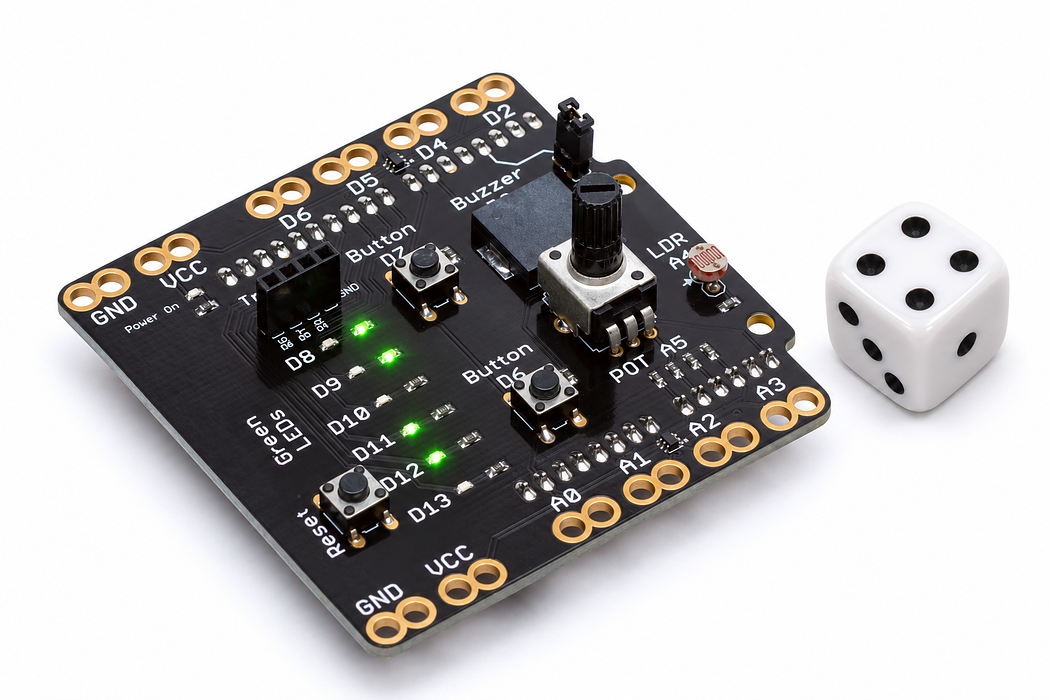
D7 starts a roll. The dial chooses how long the animation lasts. A single green LED holds the final value, with D8 representing one and D13 representing six.
You will combine inputs and outputs, use an array to control related pins, and distinguish the rolling animation from the number selected at the end. Predict whether holding the button should produce one result or many.
Before you begin
Know arrays, newPress and separate timers; random upper bound is excluded.
Your goal: Separate a random result from its animation. Show this with a prediction, a tested change and an explanation using the program’s names.
Retrieve one idea: what input, state or output did you change in the previous project?
Need a reminder? Compose a tiny tune.
Step 2 — Read the six possible results
| Lit LED | Result |
|---|---|
| D8 | 1 |
| D9 | 2 |
| D10 | 3 |
| D11 | 4 |
| D12 | 5 |
| D13 | 6 |
The onboard buzzer on D3 is optional for reading the result, but fit its jumper if you want the sound effects. The potentiometer is A5; use D7 for the button.
Step 3 — Program the shield
Choose Arduino Uno, then Verify and Upload the supplied sketch. The English instructions describe the same behaviour as the C++ beside them. Keep the USB cable connected while you test.
Step 4 — Roll slowly, then quickly
Open the serial console at 9600 baud. Set the dial near one end and tap D7. Watch the chase slow down, then identify the final LED before reading the printed result. Try the other end of the dial.
The chosen duration is captured when the roll begins. Turning the dial halfway through a roll affects the next roll. Hold D7 through an entire roll to verify that it produces only one result.
Step 5 — Explain the animation and the number
rolling separates waiting from animating. The program keeps checking time and the button while the chase runs. When time is up, random(1, 7) chooses 1 through 6; the upper bound is excluded.
The generator is pseudo-random: software produces a sequence from a starting seed. Timing the first human press makes repeated power-ups less likely to start identically. That is useful for this classroom game, but it is not proof of perfectly equal outcomes. The animation does not itself determine the result.
Read this part of the actual starter
void loop() {
  const unsigned long now = millis();
  if (newPress(now) && !rolling) {
    if (!seeded) {
      randomSeed(micros() ^ (static_cast<unsigned long>(analogRead(POT_PIN)) << 10));
      seeded = true;
    }
    rollDuration = map(analogRead(POT_PIN), 0, 1023, 600, 2400);
    rollStartedAt = lastFrameAt = now;
    chaseIndex = 0;
    rolling = true;
    showOne(chaseIndex);
    tone(BUZZER_PIN, 700, 18);
  }
showOne(index) loops over the LED array, lighting exactly the selected zero-based element. random(1,7) can return 1–6; the upper limit is excluded. The chase animation and final result are separate mechanisms. Seeding once varies the pseudorandom sequence.
Work through one case
A result of 6 becomes array index 5, which selects D13. The knob changes rollDuration from 600 to 2400 ms; it does not set the result.
Your turn: complete the trace
Result 1 selects LED_PINS[___]; result 6 selects LED_PINS[___].
Compare your trace after trying
0 and 5; subtract one to convert human results to zero-based indices.
If your answer differs
Identify the statement choosing the result, not the animation.
Step 6 — Collect evidence before changing the game
Record 30 rolls in six tally columns. Repeated values and uneven totals in a small sample are normal. Compare your group’s totals with another group’s rather than expecting each face exactly five times.
Change the duration range to 1200–3600 milliseconds, then predict and measure the difference. Extension: use two presses to produce two stored values and print their sum.
Run a controlled experiment
Record at least 30 rolls and graph counts. Explain why unequal counts in a short sample do not establish a biased die. Test that long holds do not start multiple rolls.
- Save a copy of the working starter. Reset the board so stored state begins from the declared values.
- Write the expected result before editing. Change only the named factor; keep wiring and other settings fixed.
- Edit the C++ in the editor, Verify, then Upload to the connected Uno. The starter simulation does not execute your edited C++.
- Repeat the same input sequence. Record input, expected output, observed output and an explanation. Use labelled serial values where the sketch provides them.
- If the result differs, inspect the relevant condition and pin before changing another factor. Restore and upload the saved starter to recover.
Core task: explain one changed case. Optional extension: choose a boundary or timing case and justify the extra test. Use a paper trace or annotated screenshot when physical manipulation is inaccessible; distinguish predictions from measurements.
Step 7 — Check and troubleshoot
Explain why result - 1 is used to index the LED array. Demonstrate that the displayed LED and serial result agree.
- Result seems one too high or low: check the D8-to-one mapping and the subtraction.
- Holding the button rolls repeatedly: preserve the debounced new-press check.
- No sound but the game works: inspect the buzzer jumper.
- Only D6 responds: that is the other button; this program reads D7.
Independent check — try before revealing
Would random(1,6) produce all six faces? Does a slow chase make six more likely?
Hint
Identify the statement choosing the result, not the animation.
Reasoning and feedback
No: it excludes 6 and returns 1–5. Chase speed is separate from the final random result; it is not evidence of changed probabilities.
Pseudorandom is not guaranteed fairness or suitable security. Do not infer fairness from the visual chase.
If your explanation missed a condition or stored value, add that column to your trace and try a new input. A working upload alone does not answer this check.
Step 8 — The contact starts the roll, the program finishes it
The die accepts newPress(now) only while rolling is false.
Choose Cutaway. Move Button travel from released to fully pressed, hold it there, then release it. Watch the spring dome meet and leave the contact. Compare the D7 state and voltage at each point; on this shield a pressed button reads HIGH.
Predict and explain: If you keep the contact pressed, should it repeatedly start fresh rolls?
Check your explanation
No. newPress detects a new stable press, and the rolling guard prevents another start during the animation. The physical contact alone does not count events or decide when a roll is finished. The switch is momentary: its contact opens on release. Any remembered output belongs to the program. The cutaway shows a clean contact transition; real switches may bounce, which is why some sketches debounce their input.
Step 9 — See where the roll-duration input comes from
The sketch reads A5 when a new roll starts and maps it into rollDuration, between 600 and 2400 ms.
Choose Cutaway and turn Wiper load off to represent the shield’s A5 input, which draws very little current. Move Turn the shaft to 25%, 50% and 75%. Record wiper voltage and ADC reading, and follow the moving contact on the resistive track.
Predict and explain: If the knob moves halfway through a roll, does the stored rollDuration immediately change?
Check your explanation
No. The wiper voltage changes, but this sketch captures rollDuration only when it accepts a new roll. The next roll uses the new setting. With the illustrated 5 V reference and no wiper load, the three positions give about 1.25 V / 256, 2.50 V / 512 and 3.75 V / 767. A voltage is available at A5 even though almost no current enters that input.
