

Little Bird
Crack the Code Kit 2018 - Replenishment
Already run the Crack the Code Unit of Work and want to replenish your component box and student sets? At Little Bird Electronics we have put together a r...
Get notified when back in stock
Crack the Code · Interactive learning path
See it in 3D.
Build it step by step.
Bring your kit to life with 20 guided projects. Start with your first blinking LED, then explore sensors, sound and a working pedestrian crossing.
Explore the parts. Follow the steps. Make something happen.
Electronics you can explore
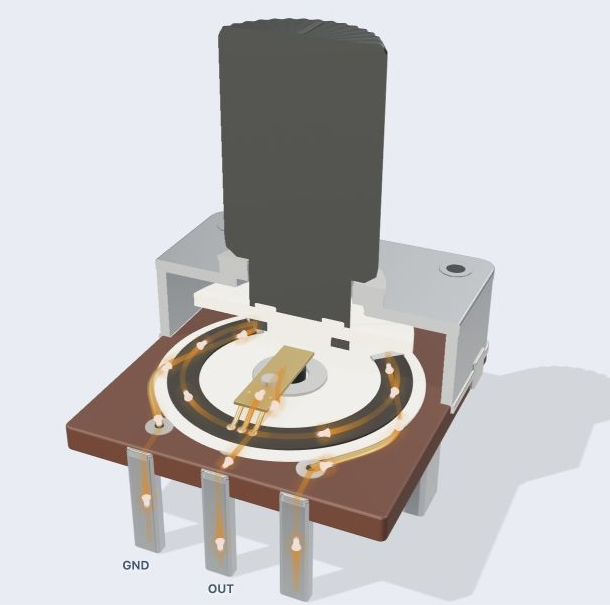
Rotate the models, reveal their insides and watch components respond. Follow current through a knob, press a button or shine light on a sensor.
A clear next step, every time
Work through wiring, explained code and checks in order. Start with a working example, change something, then test your idea on the real kit.
Code in English. Upload in Chrome.
Use the English IDE to turn plain-English instructions into Arduino C++. Inspect the code, then Verify and Upload to your Uno from desktop Chrome.
Jargon buster
Plain-language definitions for the technical terms used above.
- LDR
- A light-dependent resistor is a component whose resistance changes with light level. It is useful for simple brightness sensing, and an ADC board is needed to turn its changing analogue voltage into numbers a microcontroller or computer can read.
- LED
- A light-emitting diode (LED) is a small electronic component that emits light when current flows through it in the correct direction. Because it only conducts one way, its polarity matters, and a through-hole LED must be soldered the correct way around to light up.
- photocell
- A light-sensitive component whose electrical resistance changes with the amount of light falling on it. It matters when choosing or using light sensors, automatic lights, or brightness-detecting circuits because its response speed, resistance range, and sensitivity affect how reliably it detects light levels.
- potentiometer
- A variable resistor usually turned with a knob or shaft to create an adjustable electrical signal. It is often used for inputs such as volume, brightness or position, so it helps beginners learn how a microcontroller reads changing values.
Find this product in
Related Tutorials
Free step-by-step guides




