Little Bird
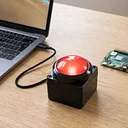
Big Game Button with Enclosure 100mm USB Green
Some inputs deserve more than a keycap. The Big Game Button is a 100mm green dome button mounted in a tough plastic desktop enclosure, made to be slapped, sm...
Get notified when back in stock
Some inputs deserve more than a keycap. The Big Game Button is a 100mm green dome button mounted in a tough plastic desktop enclosure, made to be slapped, smashed and enthusiastically buzzed, whether that's on a quiz table, a classroom desk or the front of a live event. It has a satisfying click and lights up while it's pressed, so everyone knows exactly who got there first.
Under the hood, it's a one-key USB keyboard. Plug it in and your computer sees a standard USB HID keyboard, with no drivers to install. Out of the box, pressing the button sends Enter (key down when you press, key up when you let go), which is exactly what a lot of quiz and buzzer software is waiting for. Hold it down and Enter repeats, just like holding a key on your keyboard. It works with anything that accepts a USB keyboard, including Windows, macOS, Linux and Raspberry Pi.
Want it to do something other than Enter? We wrote free, open-source setup software for that. On a Mac, a small menu bar app turns the button into a game-show buzzer, a keyboard shortcut, a burst of typed text, a shell command or a website. Shortcuts stay held for as long as the button is, so push-to-talk works too. It only changes the big button, so the Enter key on your real keyboard keeps working, and it doesn't need drivers, system extensions or any changes to macOS security settings. On a Raspberry Pi or other Linux machine, a lightweight background service runs your Python script, plays a sound, snaps a photo or presses a key whenever the button gets hit. Both install with one line in a terminal:
curl -fsSL https://littlebirdelectronics.com.au/install/big-red-button.sh | bashOn Windows, the button works as an Enter key straight away, and our guide shows how to remap just the button with free tools.
Note: The button only powers up on a USB-A to USB-C cable, like the 2m one included. On a USB-C to USB-C cable it gets no power at all: no light, and your computer won't see it. If your computer only has USB-C ports, use a USB-C to USB-A adapter or hub with the included cable.
Features:
- 100mm green dome button with a tactile click
- Lights up while pressed
- Tough plastic desktop enclosure
- Standard USB HID keyboard, so no drivers are needed
- Sends Enter by default; remap it with our free software
- USB-C socket on the button; 2m USB-A to USB-C cable included
- Works with Windows, macOS, Linux and Raspberry Pi
- Free open-source setup software for macOS 13+ and Raspberry Pi / Linux, plus a Windows guide
Documents:
Jargon buster
Plain-language definitions for the technical terms used above.
- HID
- Human Interface Device is a USB device class used for keyboards, mice, gamepads and similar controls. If a board supports HID over USB, it can act like an input device to a computer without needing a custom driver.
- USB-C
- USB-C is a small, reversible USB connector that can carry power, data and, on some devices, video over a single cable. The same connector can range from charging only to high-speed data, so the functions a given port actually supports vary.
Find this product in
Components
Source Code
Open-source libraries, firmware & example projects for this product
Setup software for the Little Bird Big Red Button (USB game buzzer): macOS app, Linux/Raspberry Pi service, Windows guide
5e626c9
3 days ago
· 2 commits
Project Guides
Step-by-step builds that use this part