

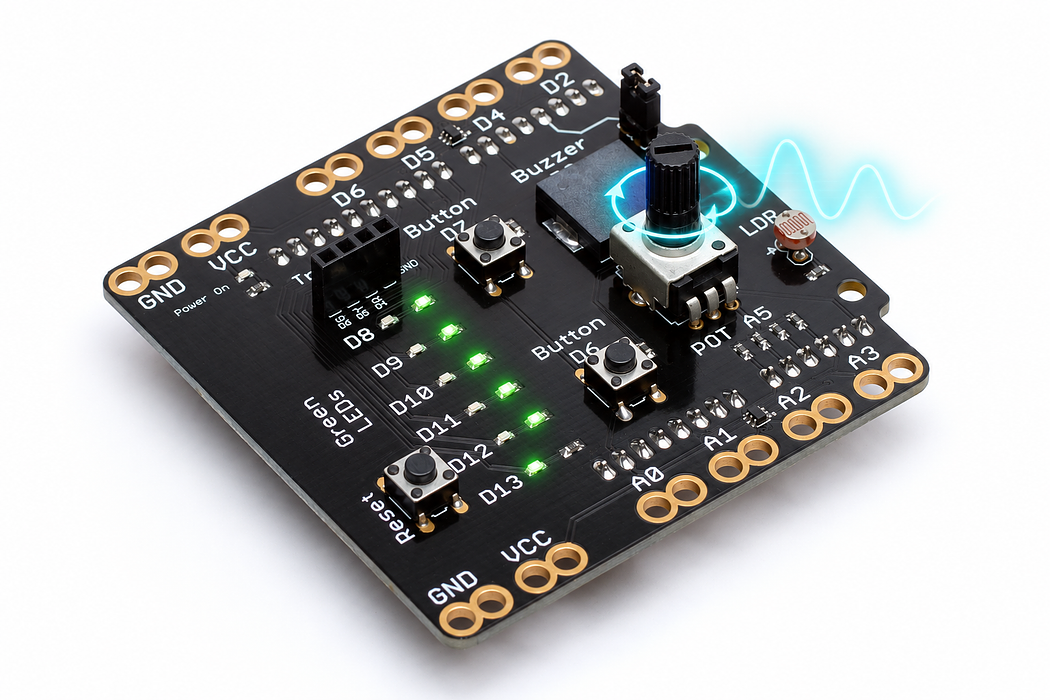
Read the knob
Turn a physical control into numbers and estimate its centre-pin voltage.
Step 1 — What you will discover
Read an analogue input and relate a changing number to the knob’s centre contact.
Predict: What number would you expect near halfway between the knob’s stops?
Before you begin
Know the knob is A5; distinguish print from println.
Your goal: Turn a voltage into data. Show this with a prediction, a tested change and an explanation using the program’s names.
Retrieve one idea: what input, state or output did you change in the previous project?
Need a reminder? Two lights, one sequence.
Step 2 — Meet this circuit
Use an Arduino Uno with the Crack the Code shield. The shield already connects its LEDs, knob, light sensor and buttons; this activity needs no jumper wires or breadboard.
If the shield is not fitted, disconnect USB power, align every shield pin with the Uno sockets, and press evenly without bending the pins. Reconnect the Uno with a USB data cable. Leave the traffic-light module disconnected for this activity.
Step 3 — Upload your program
Open the example below. Read the English plan, then choose Arduino C++ from the language selector and Arduino Uno from the board selector. Select Verify to compile. Select Pair board…, choose the Uno’s serial port, then select Upload. Use Chrome or Edge on a desktop computer with this HTTPS page for browser upload. If browser upload is unavailable, copy the complete C++ sketch into Arduino IDE, choose Arduino Uno and its port, and upload there.
Each upload replaces the previous program. Edit the supplied C++ when trying the challenges, then verify and upload again.
After upload, select Open Serial Monitor and set 9600 baud. Close other serial programs first so only one application owns the port. The Plot tab can display the labelled numeric readings.
Step 4 — Read, edit and run
The English plan and complete Arduino sketch describe the same program. Keep one working copy before making changes.
Step 5 — Run it and collect evidence
Turn the knob gently to each end, then halfway. Record the raw reading and estimated voltage at each position. Do not force the stops. Expect roughly 0–1023 and around 512 halfway; small movement in the last few counts is normal.
Step 6 — Explain what happened
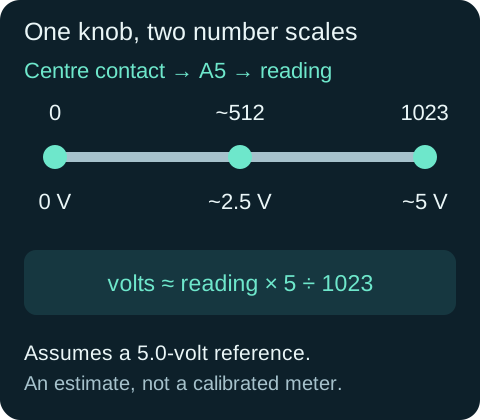
Inside the potentiometer, a moving contact touches a resistive track between the supply and ground. The shield connects that centre contact to A5. The Uno converts its voltage into one of 1024 possible readings, numbered 0–1023.
The voltage calculation assumes a 5.0-volt reference. It is an estimate from the raw reading, not a calibrated voltmeter: the actual USB supply can differ. The knob changes the input voltage; the code reports it.
Read this part of the actual starter
void loop() {
  int reading = analogRead(potPin);
  float volts = reading * 5.0 / 1023.0;
  Serial.print("knob:");
  Serial.print(reading);
  Serial.print(",volts:");
  Serial.println(volts, 2);
  delay(50);
}
analogRead(A5) samples the knob voltage as an integer from 0 to 1023 on this Uno. Local reading is replaced each loop. float volts = reading * 5.0 / 1023.0 estimates voltage using a nominal 5 V reference. print continues a line; println ends it.
Work through one case
For reading 512, the estimate is 512 × 5 / 1023 ≈ 2.50 V. The labelled serial line is knob:512,volts:2.50. It is not a separate voltmeter measurement.
Your turn: complete the trace
For readings 0, 512, 1023, estimated volts are 0, ___, ___ using the supplied 5 V reference.
Compare your trace after trying
Approximately 2.50 and 5.00 V. These are calculated estimates.
If your answer differs
Check whether the intermediate calculation can keep a fractional value.
Step 7 — Change one thing
Hold three positions and compare your readings with another group. Change the 50-millisecond wait to 250 and explain why the graph updates less often without changing the knob’s range.
Run a controlled experiment
Collect five knob positions. Predict the midpoint and compare the live serial plot against your table. Explain why repeated readings can differ by a small amount.
- Save a copy of the working starter. Reset the board so stored state begins from the declared values.
- Write the expected result before editing. Change only the named factor; keep wiring and other settings fixed.
- Edit the C++ in the editor, Verify, then Upload to the connected Uno. The starter simulation does not execute your edited C++.
- Repeat the same input sequence. Record input, expected output, observed output and an explanation. Use labelled serial values where the sketch provides them.
- If the result differs, inspect the relevant condition and pin before changing another factor. Restore and upload the saved starter to recover.
Core task: explain one changed case. Optional extension: choose a boundary or timing case and justify the extra test. Use a paper trace or annotated screenshot when physical manipulation is inaccessible; distinguish predictions from measurements.
Step 8 — Check your understanding
If the graph reacts to shadows rather than turning, check that the code reads A5, not A4. If the console is unreadable, match its speed to 9600 baud. Why are there 1024 values but a largest value of 1023?
If nothing changes: check the power light, successful upload and the selected Uno port. Disconnect power before reseating a shield. Read the first compiler error before changing several lines at once.
Independent check — try before revealing
Why would replacing 5.0 / 1023.0 with a separately calculated integer ratio 5 / 1023 break the conversion?
Hint
Check whether the intermediate calculation can keep a fractional value.
Reasoning and feedback
Integer 5 / 1023 evaluates to zero before multiplication. Floating-point operands preserve the fraction. Inspect the order and types of each expression.
The number is an ADC reading, not an angle or voltage until a conversion is applied. The physical reference voltage can differ from exactly 5 V.
If your explanation missed a condition or stored value, add that column to your trace and try a new input. A working upload alone does not answer this check.
Step 9 — Why turning the knob changes A5
Open the potentiometer with the cutaway slider. Turn the shaft and follow the moving wiper. The outer pins connect to ground and five volts; the middle pin takes its voltage from the contact point.
Start with Wiper load switched off to match the shield’s A5 input. At halfway, expect about 2.5 volts and ADC 512. Turn Wiper load on to add an output resistor to ground. Electron flow through the middle pin now changes with the knob, and the load also changes the output voltage: halfway gives 2.0 volts for the illustrated equal-resistance load.
