


Beginner
Use a Moisture Sensor with Arduino
This sensor allows you to read the moister in soil
By Cherie Tan
In this guide, you will learn how you can use a moisture sensor with an Arduino, to determine the amount of moisture in a substance.
After completing this guide, you could create an Arduino plant watering system or a simple moisture detector for your beloved garden plants.
You will find a moisture sensor probe and breakout module
Step 1 — Get your moisture sensor and probe
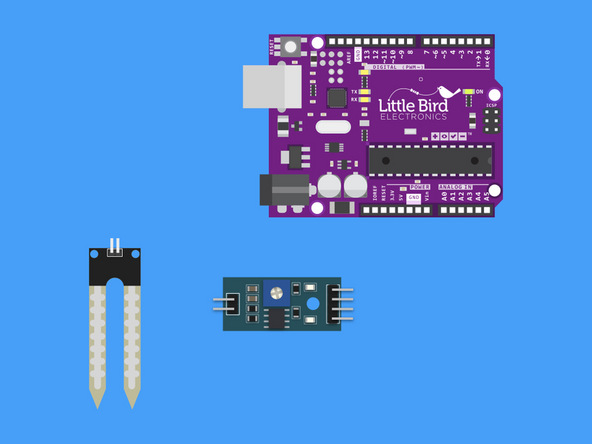
You will find a moisture sensor probe and breakout module
Step 2 — Connect the Probe to the Breakout Module
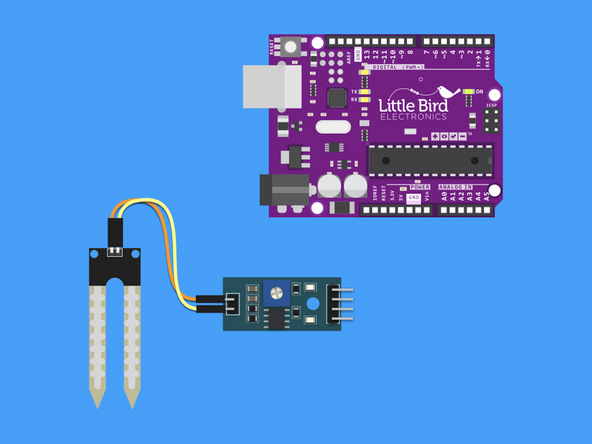
Connect the Probe to the Breakout Module.
The order of the wires doesn't matter.
Step 3 — Connect the 5V line from the Arduino to the Module
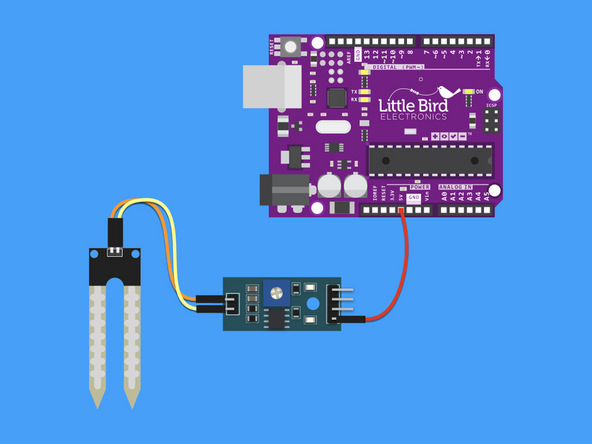
Connect the 5V line from the Arduino to the Module.
Step 4 — Connect the Ground line from the Arduino to the Module
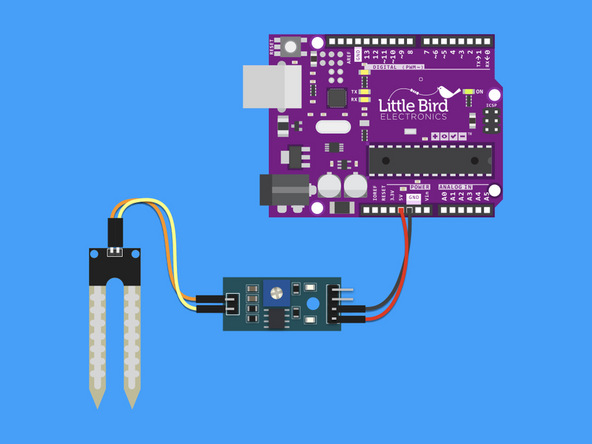
Connect the Ground line from the Arduino to the Module.
Step 5 — Connect Analogue 0 to the Module
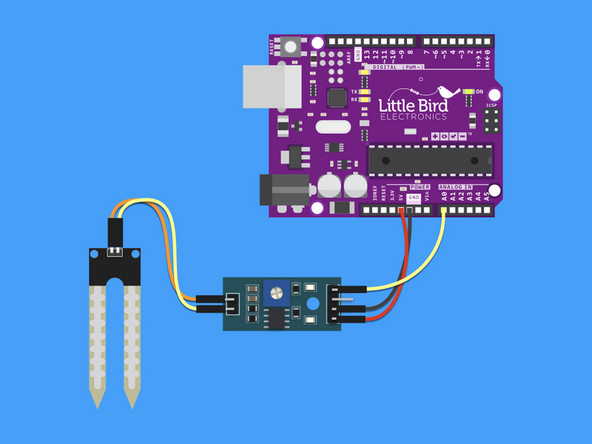
Connect Arduino Analogue 0 to the Module.
Step 6 — Upload the code
int ledPin = 13; // Wet Indicator at Digital Pin D13
int sensor = 0; // Soil Sensor input at Analog Pin A0
int value = 0;

void setup() {
  Serial.begin(9600);
  pinMode(ledPin, OUTPUT);
  Serial.println("SOIL MOISTURE SENSOR");
  Serial.println("-----------------------------");
}

void loop() {
  value = analogRead(sensor);
  value = value / 10;
  Serial.println(value);
  if (value < 50) {
    digitalWrite(ledPin, HIGH);
  } else {
    digitalWrite(ledPin, LOW);
  }
  delay(1000);
}
Copy this code and load it into the Arduino IDE and Upload it
Open the Serial Monitor
Out of moist soil you should get a reading around 100
Once in moist soil or a glass of water you should get <40
Step 7 — Make sure your Christmas Tree doesn't dry out
Each year our Christmas Tree dries out and turns brown long before Christmas Day. This year, using the moisture sensor, we are going to make sure it alway has enough water!
Parts List
Optional Extras (2)

Project Summary
2 parts total
Required parts
$0.00
Optional extras
+$23.05
Total (required)
$0.00
Unavailable items will be skipped
