

Raspberry Pi Weather Station
Build a home weather station that monitors temperature, pressure and displays readings on a screen.
Overview
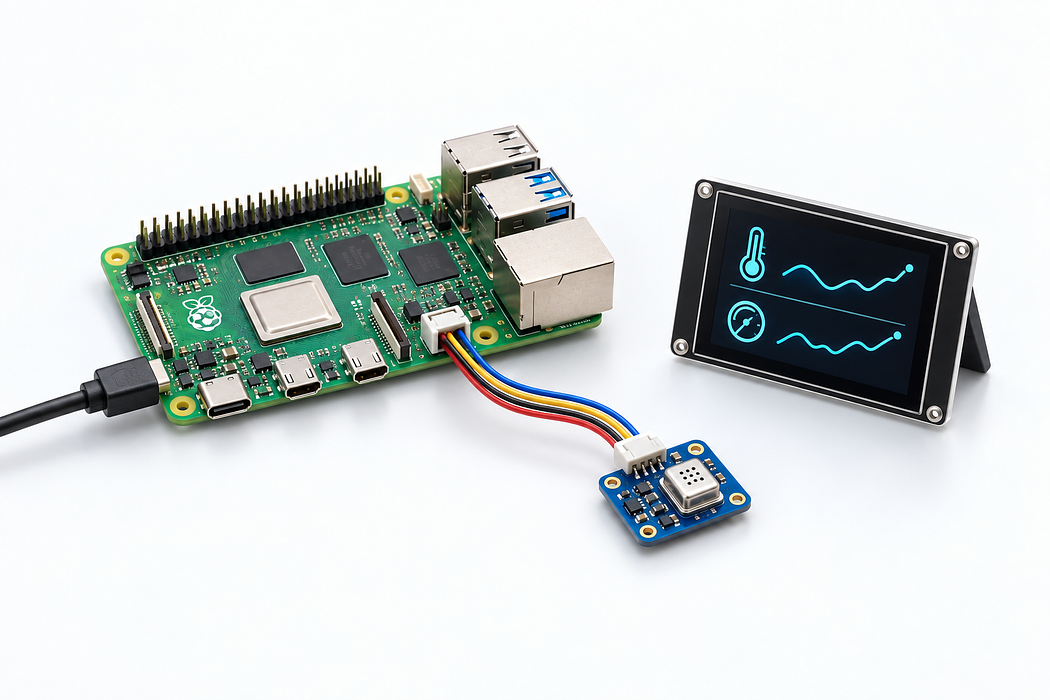
In this project, you will build a simple weather station using a Raspberry Pi and environmental sensors. The station will measure temperature and barometric pressure, displaying the readings on a connected display.
What You Will Learn
- Setting up a Raspberry Pi with sensors
- Reading I2C sensor data with Python
- Displaying real-time data on a screen
- Basic data logging to CSV files
Step 1: Hardware Setup
Connect the BMP585 temperature and pressure sensor to your Raspberry Pi using the I2C pins (SDA and SCL). The sensor uses the Qwiic/STEMMA QT connector for easy plug-and-play wiring.
Step 2: Software Installation
Install the required Python libraries using pip. You will need the adafruit-circuitpython-bmp3xx library for the sensor and a display library if using an external screen.
- Enable I2C in raspi-config
- Install CircuitPython libraries
- Run the test script to verify sensor readings
Step 3: Display and Logging
Connect the display and write a Python script that reads sensor data every 30 seconds, shows it on screen, and logs to a CSV file for later analysis.
Parts List
Required Parts (4)

Temperature and pressure sensor
x1
$29.05
In stock

For connecting sensor to Pi
x1
$30.40
In stockOptional Extras (1)

Project Summary
5 parts total
Unavailable items will be skipped
