Speaker for micro:bit
Love this... nice and loud!
Joanne Hadley
/products/{handle}.md)
and JSON
(/products.json, /products/{handle}.json).
Pimoroni
The MonkMakes Speaker for micro:bit is a compact, amplified speaker that connects to your micro:bit using alligator clips. It's the easiest way to add sound ...
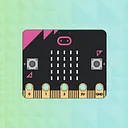
The MonkMakes Speaker for micro:bit is a compact, amplified speaker that connects to your micro:bit using alligator clips. It's the easiest way to add sound output to your micro:bit projects — just clip on and start coding.
With built-in amplification, reverse polarity protection, and an LED power indicator, it's designed to be beginner-friendly and classroom-ready. Use it to play melodies, create musical instruments, or add sound effects to your projects.
Connect the speaker to your micro:bit using alligator clips. Make sure the clips are perpendicular to the board so they don't touch neighbouring connectors on the edge connector.
Try it with the MakeCode Blocks Editor: add an on button A pressed block from the Input section, then add a start melody block from the Music section. Click Download and copy the file to your micro:bit.
For MicroPython, use the Python Editor with this example:
from microbit import *
import music

while True:
    if button_a.was_pressed():
music.play(music.ENTERTAINER)Plain-language definitions for the technical terms used above.
Find this product in
Audio & Video
Brands
STEM & Education
Free step-by-step guides

Hi, I'm Maddy. My team and I are ready to help with your order or any questions.