SparkFun
SparkFun Qwiic Navigation Switch
·
Product Overview Meet the SparkFun Navigation Switch, a nifty little addition to your I²C bus that features a 5-way tactile switch akin to a joystick! This ...
Get notified when back in stock
Product Overview
Meet the SparkFun Navigation Switch, a nifty little addition to your I²C bus that features a 5-way tactile switch akin to a joystick! This compact component allows you to interact with your microcontroller by pushing the switch in any of five directions—up, down, left, right, or centre—adding a new dimension to your project’s input options. Plus, the integrated RGB status LED provides immediate visual feedback for each action.
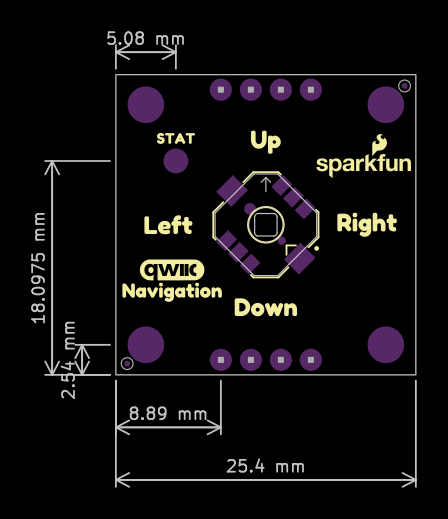
Onboard, you'll find a 5-way tactile switch where each direction is connected to a momentary switch. These are read by the PCA9554 8-bit I²C I/O expander, which alerts the microcontroller when a switch is pressed. Subsequently, your microcontroller can control the RGB LED for visual indicators. Each LED channel can be individually disconnected from the PCA9554’s GPIO and rerouted to an alternative input if needed. An interrupt pin is also included, enabling your microcontroller to quickly detect state changes. Thanks to our handy Qwiic system, you can connect it to your setup without any soldering. For those who prefer a more traditional approach, we've also provided 0.1"-spaced pins for breadboarding.
If your project requires multiple Qwiic Navigation Switches, worry not—each board comes with a configurable I²C address, allowing you to daisy-chain multiple switches via Qwiic and address each one uniquely.
We’ve crafted a basic example for the Qwiic Navigation Switch available in our GitHub Hardware repository. To interact with the PCA9554’s eight separate I/O pins, you'll need the SparkFun I²C Expander Arduino Library, which can be easily downloaded through the Arduino library manager or directly from GitHub.
Perfect for projects that need extra input control, the Qwiic Navigation Switch can enhance your menu navigation or even serve as a nifty controller for a small robot!
Features & Specs
- Input voltage: 3.3V
- 5-way tactile switch
- PCA9554 8-bit I²C I/O expander
- 2x Horizontal Qwiic connectors
- 2.2kΩ I²C pull-up resistors
-
Breakout PTHs
- GND: Ground
- 3V3: 3.3V
- SDA: I²C Data
- SCL: I²C Clock
- INT: Interrupt, active low
- 5: GPIO5
- 6: GPIO6
- 7: GPIO7
-
LEDs
- RGB non-addressable status
- Red power
-
Jumpers
- Power LED: PWR
- GPIO7/Red LED: 7
- GPIO6/Green LED: 6
- GPIO5/Blue LED: 5
- I²C pull-up resistors: I²C
- I²C selectable address (ADR2, ADR1, ADR0)
- 0x20 (Default): 000
- 0x21: 001
- 0x22: 010
- 0x23: 011
- 0x24: 100
- 0x25: 101
- 0x26: 110
- 0x27: 111
Board Dimensions: 25.4mm x 25.4mm
Weight: 2.6g
Documentation
Jargon buster
Plain-language definitions for the technical terms used above.
- active LOW
- Active LOW describes a signal that is treated as active, asserted or 'on' when it sits at a low voltage near ground, rather than at a high voltage. It applies to inputs, outputs and control lines (such as reset or chip-select), so it matters when wiring devices so that signal levels are interpreted as intended.
- breakout
- A breakout board carries a small or fine-pitched component and brings its connections out to standard, breadboard- and header-friendly pins. Describing a part as a breakout means it can be wired into a project without soldering directly to the component's tiny contacts.
- GND
- GND is the ground or reference connection (0 V) for a circuit. When connecting two devices together, their grounds must be joined so both agree on what counts as a low or high signal.
- GPIO
- General-purpose input/output pins are microcontroller pins you can set in software to read signals, switch devices on and off, or connect to peripherals. The number of GPIO pins matters because it limits how many buttons, LEDs, sensors, and other parts you can wire directly to the board.
- I/O expander
- An I/O expander is a chip that adds extra input and output pins controlled through a bus such as I2C or SPI. It can drive buttons, LEDs, relays, resets, or other control lines without using up scarce microcontroller pins.
- LED
- A light-emitting diode (LED) is a small electronic component that emits light when current flows through it in the correct direction. Because it only conducts one way, its polarity matters, and a through-hole LED must be soldered the correct way around to light up.
- microcontroller
- A microcontroller is a small computer on a single chip that runs a stored program and controls connected inputs and outputs such as buttons, sensors, displays and communication interfaces. In a device built around one, it is the part that executes the code and coordinates the device's behaviour.
- PCA9554
- The PCA9554 is an I/O expander chip that adds extra digital input and output pins over an I2C bus. On a display driver board, it can handle support signals such as reset, buttons, or backlight control while leaving the main microcontroller pins free.
- Qwiic
- Qwiic is a plug-in connector system for I2C devices that uses small 4-pin cables, so you can connect compatible sensors without soldering. It matters because your controller or adapter also needs Qwiic, or you will need a cable or breakout to wire it up.
- RGB
- Short for red, green and blue, the three primary colours of light that are mixed in varying amounts to make a wide range of colours. In electronics RGB can refer to an LED or pixel that blends these three colours, or to a colour signal or interface that carries separate red, green and blue channels.
- SCL
- The clock line used by the I2C bus to keep data transfers timed between a controller and connected devices. When wiring I2C, SCL must be connected to the SCL pin on every device sharing the bus.
- SDA
- The data line used by the I2C bus to carry information between a controller and connected devices. When wiring I2C, SDA must be connected to the SDA pin on every device sharing the bus.
Find this product in
Components
Qwiic Navigation Switch Schematic
Schematic · 64.8 KB · Click any page to view full size
SF303GJ26 5-Way Tactile Switch Datasheet
Datasheet · 144.6 KB · Click any page to view full size
PCA9554 Datasheet
Datasheet · 1.7 MB · Click any page to view full size
Supplier page — sparkfun.com
Supplier Description · 741.8 KB · Click any page to view full size
Resources & Downloads
Guides, code examples, and more
Source Code
Open-source libraries, firmware & example projects for this product
An Arduino library for interfacing with 4 and 8-bit I2C GPIO expanders. PCA9534/TCA9534, PCA9536/TCA9536, PCA9537/TCA9537, PCA9554/TCA9554, PCA9556/TCA9556, PCA9557/TCA9557 are supported.
cc4ebc1
8 months ago
· 21 commits
- examples Fix print in example 1 8 months ago
- src Add support for PCA9555/TCA9555 16-bit expanders 8 months ago
- .gitattributes Initial commit almost 2 years ago
- .gitignore Initial commit almost 2 years ago
- keywords.txt Add getInputRegister almost 2 years ago
- library.properties Add support for PCA9555/TCA9555 16-bit expanders 8 months ago
- LICENSE.md Initial commit almost 2 years ago
- README.md Update README.md over 1 year ago
Documentation, example code, and hardware design files for the SparkFun Qwiic Navigation Switch. Add a Navigation Switch to your next project with Qwiic!
b64c0da
5 months ago
· 21 commits
- .github Update mkdocs.yml 5 months ago
- docs Update product link due to issue with redirecting over 1 year ago
- Firmware Update SCH to v11 almost 2 years ago
- Hardware Update SCH to v11 almost 2 years ago
- overrides Initial Push GitHub Pages almost 2 years ago
- .gitattributes Initial commit almost 2 years ago
- .gitignore Initial commit almost 2 years ago
- CONTRIBUTING.md Update code for PCA9554 Populated on Board almost 2 years ago
- ISSUE_TEMPLATE.md Initial Push GitHub Pages almost 2 years ago
- LICENSE.md Initial Push GitHub Pages almost 2 years ago
- mkdocs.yml Update mkdocs.yml 5 months ago
- README.md Update README.md over 1 year ago