SparkFun
SparkFun MicroMod GNSS Function Board - ZED-F9P
With GNSS you are able to know where you are, where you're going, and how to get there anywhere on Earth within 30 seconds. This means the higher the accurac...
Get notified when back in stock
- Concurrent reception of GPS, GLONASS, Galileo and BeiDou
- Receives both L1C/A and L2C bands
- Input Voltage: 5V or 3.3V but all logic is 3.3V
- ZED-F9P Current Consumption: 68mA - 130mA (varies with constellations and tracking state)
- Time to First Fix: 25s (cold), 2s (hot)
- Max Navigation Rate:
- PVT (basic location over UBX binary protocol) - 25Hz
- RTK - 20Hz
- Raw - 25Hz
- Horizontal Position Accuracy:
- 2.5m without RTK
- 0.010m with RTK
- Operational Limits
- Max G: ≤4G
- Max Altitude: 50km (49.7 miles)
- Max Velocity: 500m/s (1118mph)
- 1.5mAh battery backup for RTC
- Isolation switch for all MicroMod M.2 connections
- I/O decoupling for all PTH connections
- LEDs
- V_ZED - ZED-F9P Power
- PPS - Pulse Per Second Indicator
- RTK - RTK Lock Status Indicator
- Jumpers
- USB PWR EN
- SHLD
- SUP
- DSEL
- WP
- PWR
- PPS
- RTK
- Connectors and Ports
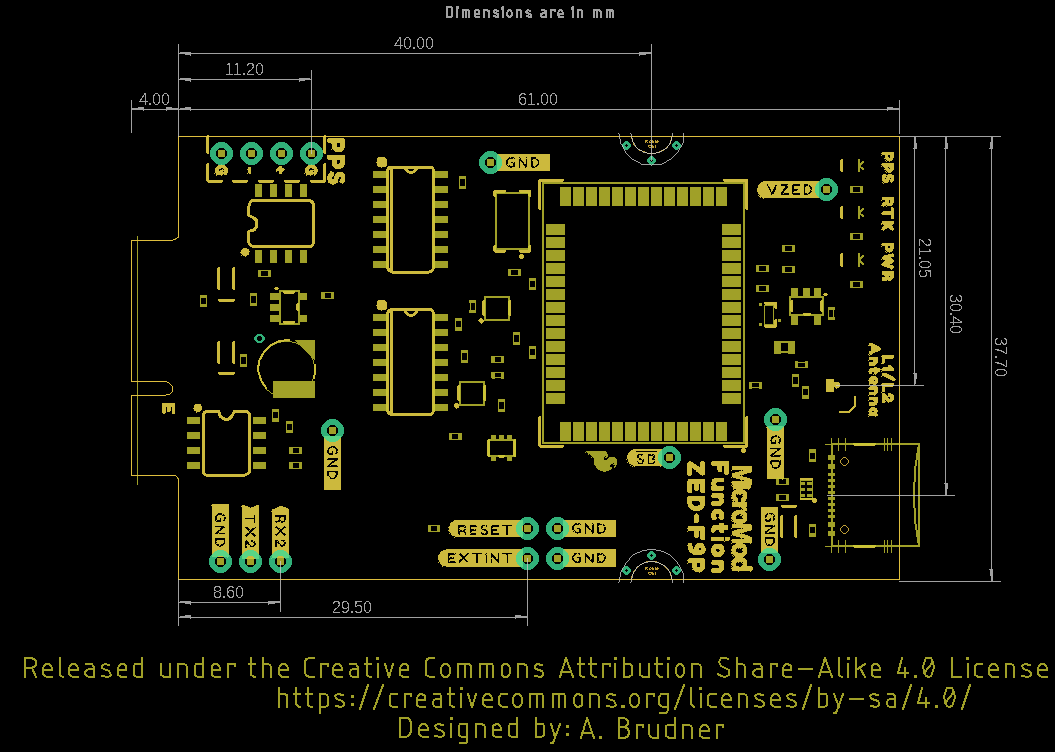
- 1x M.2 (Solderless access to ZED-F9P via UART1, SPI, and I2C)
- 1x USB Type C (Programming Processor Board, Configuring ZED-F9P module)
- 1x u.Fl (GNSS Antenna)
- Datasheet
- UBX and NMEA Protocol Manual
- Integration Manual
- Product Summary
- Release Notes - FW1.00
- Example RTCM output
- u-blox ECCN
Jargon buster
Plain-language definitions for the technical terms used above.
- 3.3V TTL
- 3.3V TTL means the serial logic signals use 3.3 volt levels rather than 5 volts. This matters because connecting it directly to a 5V-only signal can damage the module or cause unreliable communication unless level shifting is used.
- COM port
- A COM port is how a computer (chiefly under Windows) presents a serial port to software, whether a physical RS-232 port or a virtual port created when a USB-to-serial device is plugged in. Software can then communicate with the connected device over serial using a terminal or configuration program.
- Galileo
- Europe’s satellite navigation system. Galileo support can improve satellite availability and accuracy, especially when combined with GPS and other constellations.
- GLONASS
- Russia’s satellite navigation system. A receiver that can also use GLONASS has more satellites to choose from, which can improve positioning reliability when the sky view is partly blocked.
- GNSS
- GNSS stands for Global Navigation Satellite System, an umbrella term for satellite positioning networks such as GPS, GLONASS, Galileo and BeiDou. Receivers use these satellites to determine position, and high-precision units can output a steady stream of serial position data.
- GPS
- The US satellite navigation system used by GNSS receivers to calculate position and time. Support for GPS is important because it is widely available and often used together with other constellations for more reliable positioning.
- I2C
- I2C is a two-wire communication bus used by many sensors and small modules. It matters because several I2C devices can share the same two wires, but each device needs a compatible address and your controller must support I2C.
- I2C address
- An I2C address is the number a device uses so a microcontroller can tell it apart from other devices on the same I2C bus. It matters because two devices with the same fixed address may conflict if used together.
- L1C/A
- A GPS signal band used by many GNSS receivers for standard positioning. Support for this band helps determine which satellite signals the receiver can use and how well it can maintain a location fix.
- L2C
- A second GPS signal band used by dual-band GNSS receivers to improve precision and reduce errors caused by the atmosphere. It matters for RTK and high-accuracy applications because using two bands can produce faster and more reliable centimetre-level fixes.
- M.2
- M.2 is a compact edge-connector standard for plugging small modules - such as SSDs, wireless cards or microcontroller modules - into a host board without soldering. The same slot shape can carry different interfaces (for example PCIe, SATA or USB), so keying and the supported module type need to be checked.
- microcontroller
- A microcontroller is a small computer on a single chip that runs a stored program and controls connected inputs and outputs such as buttons, sensors, displays and communication interfaces. In a device built around one, it is the part that executes the code and coordinates the device's behaviour.
- MicroMod
- MicroMod is a modular board system where a small processor board plugs into a separate carrier board (via an M.2 connector) that provides connectors, power, and peripherals. Within the MicroMod system, a board is either a processor board or a carrier board, and you need a matching pair of both before you can run project code.
- multiplexer
- A multiplexer (mux) is a chip or circuit that selects one of several input signals and routes it to a single shared output, with select lines choosing which input is connected; running the same idea in reverse, to send one input to a chosen output, gives a demultiplexer. Multiplexers let a single controller or line work with several signals or devices that would otherwise clash on a shared connection.
- PTH
- Plated through-hole means the pin holes are metal-lined so solder connects the pad on both sides of the board. It is useful for connectors and headers that need a strong mechanical and electrical connection.
- PVT
- Position, velocity and time data reported by a GNSS receiver. Knowing the PVT update rate helps you judge how often the board can provide basic navigation information to your project.
- RTC
- A Real-Time Clock keeps track of time even when the main processor is asleep or powered down, usually with a small backup battery. It matters for data logging and tracking projects that need accurate timestamps.
- RTCM 3.x
- RTCM 3.x is a standard data format used to send GNSS correction information from a base station to a rover. It matters because both ends of an RTK setup need to understand the correction format to achieve high-accuracy positioning.
- RTK
- Real-Time Kinematic positioning is a GNSS technique that uses correction data from a base station to greatly improve location accuracy. It matters if you need centimetre-level positioning for robotics, mapping, surveying, or tracking rather than ordinary metre-level GPS accuracy.
- SMA
- SMA is a small threaded coaxial (RF) connector widely used to attach antennas and other radio-frequency cables. A device with SMA antenna ports needs antennas or pigtails with matching SMA connectors, or a suitable adapter, to connect to them.
- SPI
- A fast serial communication bus often used for displays, memory cards, and sensors. It matters because SPI devices need specific pins for clock and data, plus a separate chip-select line for each device.
- Survey-in mode
- Survey-in mode is a GNSS base-station setup process in which a receiver averages its own position over a set period to establish a fixed reference location. A receiver that supports survey-in can act as an RTK base and generate correction data for one or more rover receivers.
- u.FL
- u.FL is a tiny snap-on antenna connector often used on compact wireless boards. A board with u.FL usually needs an external antenna, which matters if the product will be inside an enclosure or needs better antenna placement.
- UBX binary protocol
- UBX is u-blox’s binary communication protocol for sending configuration commands and receiving detailed navigation data. It matters when you want faster, more compact, or more complete data than standard text-based GPS messages can provide.
- USB-C
- USB-C is a small, reversible USB connector that can carry power, data and, on some devices, video over a single cable. The same connector can range from charging only to high-speed data, so the functions a given port actually supports vary.
- ZED-F9P
- A u-blox GNSS receiver module designed for high-precision positioning, including RTK rover and base-station use. The exact module matters because it determines the supported satellite bands, update rates, correction formats and achievable accuracy.
Find this product in
Brands
Sensors & Input
MicroMod GNSS ZED-F9P Schematic
Schematic · 188.1 KB · Click any page to view full size
ZED-F9P Datasheet
Datasheet · 1.1 MB · Click any page to view full size
ZED-F9P UBX and NMEA Protocol Manual
User Guide · 3.3 MB · Click any page to view full size
ZED-F9P Integration Manual
User Guide · 9.5 MB · Click any page to view full size
ZED-F9P Product Summary
Product Brief · 325.7 KB · Click any page to view full size
ZED-F9P Firmware 1.00 Release Notes
Product Change Note · 126.3 KB · Click any page to view full size
u-blox ECCN Document
Compliance · 27.8 KB · Click any page to view full size
Supplier page — sparkfun.com
Supplier Description · 696.2 KB · Click any page to view full size
AntennasForRTK WhitePaper UBX 16010559
Circuit Diagram · 1.5 MB · Click any page to view full size
SparkFun MicroMod Interface v1.0 Pinout
Pinout · 27.5 KB · Click any page to view full size
SparkFun MicroMod Interface v1.0 Pin Descriptions
Document · 58.2 KB · Click any page to view full size
MicroMod GNSS Carrier Board ZED F9P Schematic
Schematic · 305.9 KB · Click any page to view full size
MicroMod General Pinout v10 Graphical Datasheet
Datasheet · 984.8 KB · Click any page to view full size
MicroMod M.2 Connector Datasheet TE 2199230 4
Datasheet · 336.1 KB · Click any page to view full size
MicroMod Reflowable Standoff
Datasheet · 1.2 MB · Click any page to view full size
MicroMod Reflowable Standoff
Datasheet · 1.2 MB · Click any page to view full size
AP7361C
Document · 909.5 KB · Click any page to view full size
Resources & Downloads
Guides, code examples, and more
MicroMod GNSS ZED-F9P Eagle Files
Schematic · ZIP · 272.6 KB
Eagle PCB design files for the MicroMod GNSS Function Board - ZED-F9P
ZED-F9P Example RTCM Output
Document · TXT · 509 B
Sample RTCM output data from the ZED-F9P receiver
main
Example Code · ZIP · 663.3 KB
MicroMod GNSS Carrier Board ZED F9P
Schematic · ZIP · 275.9 KB
Source Code
Open-source libraries, firmware & example projects for this product
An Arduino library which allows you to communicate seamlessly with u-blox GNSS modules using the Configuration Interface
7610634
4 months ago
· 314 commits
- .github Update compile-sketch.yml about 1 year ago
- examples Create Example1_Galileo_HAS.ino 4 months ago
- img Initial commit almost 4 years ago
- keys v3.1.14 : Add keys from u-blox-X20-HPG-2.10 4 months ago
- src Add getPositionAccuracyPOSECEF helper method 4 months ago
- Utils UBX_Integrity_Checker improvements: over 1 year ago
- .gitattributes Initial commit almost 4 years ago
- .gitignore Initial commit almost 4 years ago
- Adding_New_Messages.md Update Adding_New_Messages.md over 3 years ago
- CONTRIBUTING.md Markdown updates almost 4 years ago
- ISSUE_TEMPLATE.md Initial commit almost 4 years ago
- keywords.txt Add getPositionAccuracyPOSECEF helper method 4 months ago
- library.properties v3.1.14 : Add keys from u-blox-X20-HPG-2.10 4 months ago
- LICENSE.md Initial commit almost 4 years ago
- README.md Update README.md 10 months ago
MicroMod Function Board for the u-blox ZED-F9P High Precision GNSS module.
94a722c
over 3 years ago
· 66 commits
- .github Update feature_request.md over 4 years ago
- Documentation Delete ZED-F9P_Data_Sheet.pdf over 3 years ago
- Firmware Initial commit over 4 years ago
- Hardware Decrease V_USB vdiv resistors. over 4 years ago
- Libraries Updated footprint for NOT gate. over 4 years ago
- Production Add Reds Panel. over 4 years ago
- Software Initial commit over 4 years ago
- .gitattributes Initial commit over 4 years ago
- .gitignore First day of layout. over 4 years ago
- CONTRIBUTING.md Initial commit over 4 years ago
- LICENSE.md Initial commit over 4 years ago
- README.md Updated README.md about 4 years ago