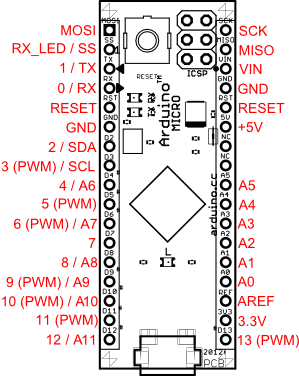
- Bootloader
-
Small starter software on a microcontroller that lets new code be uploaded before the main program runs. Knowing how to enter bootloader mode matters when you need to program the board or recover it after a faulty sketch.
- DC
-
DC means direct current, where electricity flows in one constant direction, as supplied by batteries, USB ports and many plug-pack power supplies. When a product specifies DC, it runs from a DC supply rather than mains AC, so you need to provide the correct voltage and polarity.
- EEPROM
-
A type of non-volatile memory that keeps stored data even when power is turned off. In a sensor module, it can be used to store settings or calibration data so they do not need to be re-entered every time.
- Flash memory
-
Flash memory is non-volatile memory that retains stored data even when power is removed, and can be erased and rewritten in blocks. It lets data such as firmware, settings or saved records persist across power cycles.
- HID
-
Human Interface Device is a USB device class used for keyboards, mice, gamepads and similar controls. If a board supports HID over USB, it can act like an input device to a computer without needing a custom driver.
- microcontroller
-
A microcontroller is a small computer on a single chip that runs a stored program and controls connected inputs and outputs such as buttons, sensors, displays and communication interfaces. In a device built around one, it is the part that executes the code and coordinates the device's behaviour.
- MIDI
-
MIDI is a standard way for electronic instruments, controllers, and software to send musical control messages such as notes, velocity, and timing. If a board supports MIDI, it can be triggered from keyboards, drum pads, sequencers, or other music gear rather than only from buttons or code.
- native USB
-
Native USB means the microcontroller itself handles USB communication, rather than using a separate USB-to-serial chip. This matters for programming, debugging, and projects that need the board to act directly as a USB device.
- PWM
-
Pulse Width Modulation is a way for a digital pin to simulate variable output power by switching on and off very quickly. It matters for controlling things like LED brightness, motor speed, or servo-style signals from a microcontroller pin.
- solderless breadboard
-
A reusable board with rows of internally connected holes for building circuits by pushing in components and jumper wires, with no soldering required. It lets you prototype and rewire a circuit quickly and reversibly before committing to a permanent, soldered build.
- SRAM
-
Fast temporary memory used by a processor while a program is running. More SRAM helps with projects that handle larger data buffers, networking, displays, or more complex code.