

Crack the Code · Interactive learning path
See it in 3D.
Build it step by step.
Bring your kit to life with 20 guided projects. Start with your first blinking LED, then explore sensors, sound and a working pedestrian crossing.
Explore the parts. Follow the steps. Make something happen.
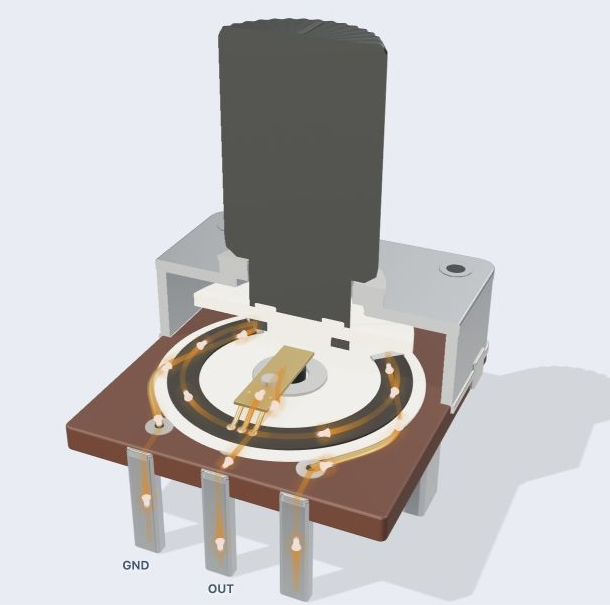
Electronics you can explore
Rotate the models, reveal their insides and watch components respond. Follow current through a knob, press a button or shine light on a sensor.
A clear next step, every time
Work through wiring, explained code and checks in order. Start with a working example, change something, then test your idea on the real kit.
Code in English. Upload in Chrome.
Use the English IDE to turn plain-English instructions into Arduino C++. Inspect the code, then Verify and Upload to your Uno from desktop Chrome.

Crack the Code
A NSW Technology Mandatory 7–8 unit of work: students design, produce and evaluate an Arduino-based alarm/alert system. Four hands-on Plug-Run-Play activities — Blink, Button, Analog input and Buzzer — build the coding skills (sequence, branching, variables, the Serial Monitor) the design project needs. Built around the Crack the Code Arduino kit with the MAAS ThinkerShield.
The design brief
Utilising your skills in control technologies and coding, you are to design, produce and evaluate an alarm/alert system to inform you if someone has broken into something you own or care for — for example a bedroom, a box or a treasure chest.
For teachers
Lesson plans, NSW syllabus mapping, assessment rubric, prep & safety, differentiation.
Open teacher dashboardFor students
Step-by-step activities, code snippets you can copy, challenges, reflections — without the teacher's marking guide.
Open student homePresent in class
Lesson-by-lesson slide decks built for the projector — student-visible slides up front, speaker notes for the teacher.
Open presentation decksThe 10-week arc
-
1Identifying & defining
Weeks 1–2 — Understanding control technologies
Identify control technologies in the world around us, describe how they use inputs, processing and outputs, and explain what a microcontroller and a shield are.
-
2Researching & planning
Weeks 1–2 — First code — Blink, the IDE & binary
Write, upload and modify your first Arduino sketch — make the on-board LED blink, explain each line, and modify it to meet a series of challenges.
-
3Researching & planning
Weeks 3–4 — Inputs, outputs & the PRP activities
Use digital and analog inputs to control outputs. Read a button with `digitalRead`, a potentiometer/LDR with `analogRead`, and drive an LED and a piezo buzzer. Use the Serial Monitor to inspect what your program is doing.
-
4Researching & planning
Weeks 5–7 — Generating, developing & testing design ideas
Generate four alarm-system design ideas, evaluate each with PMI, choose two to test, and pick the strongest to take forward as your project.
-
5Producing & implementing
Weeks 8–9 — Final design, circuits & electronics
Build a working circuit for your chosen alarm design — off the ThinkerShield, on a breadboard or soldered — and house it in an appropriate enclosure.
-
6Testing & evaluating
Week 10 — Final evaluation
Evaluate your finished alarm system against the design brief and the criteria for success, and reflect on what you'd change next time.
Pick a role above to see the lesson-by-lesson detail. The teacher view shows prep, demo steps, misconceptions and evidence; the student view shows the activity itself.
