


Beginner
Sound Detection with Arduino
Learn to use a sound sensor to detect sound around you!
By Cherie Tan
In this guide, you will learn how to use a sound sensor with an Arduino, so that an LED turns on when sound is detected.
After completing this guide, you can incorporate sound detection in your next Arduino projects!
Connect the Sound Module to 5V.
Step 1 — Connect the Sound Module to 5V
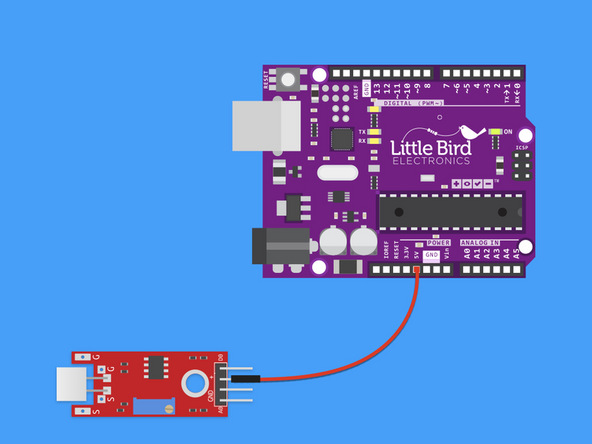
Connect the Sound Module to 5V.
Step 2 — Connect the Sound Module to Ground
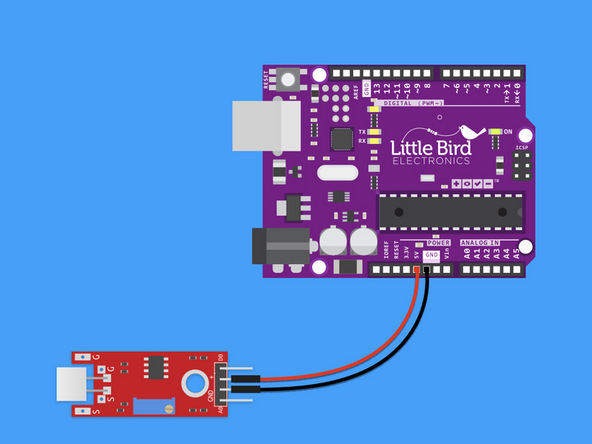
Connect the Sound Module to Ground
Step 3 — Connect the Sound Module to A0
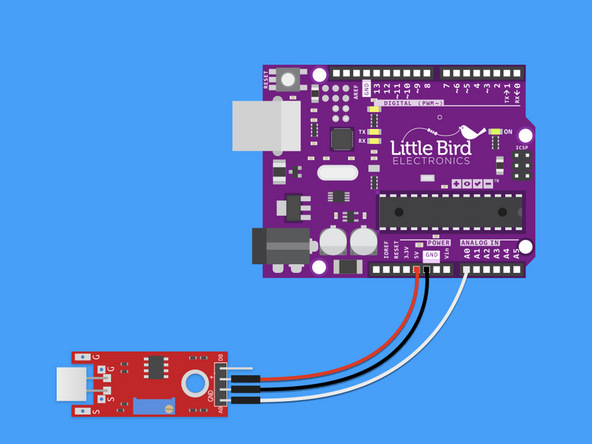
Connect the Sound Module to Analogue Pin 0.
Step 4 — Uploading the Sound Sensor Code
int led = 13; // We are going to make Pin 13 LED blink
int threshold = 28; // Change this to the level you want the light to come on
int volume;

void setup() {
  Serial.begin(9600);
  pinMode(led, OUTPUT);
}

void loop() {

  volume = analogRead(A0); // Read the value from the Analog PIN A0

  Serial.println(volume);
  delay(100);

  if (volume >= threshold) {
    digitalWrite(led, HIGH); //Turn ON Led
  } else {
    digitalWrite(led, LOW); // Turn OFF Led
  }

}
Copy the code and upload it to your Arduino.
Open the Serial Monitor to see the values you are getting in a quite room.
You may want to change the value of 'Threshold' so that when a loud sound is made the LED comes on.
Parts List
Optional Extras (2)

Project Summary
2 parts total
Required parts
$0.00
Optional extras
+$27.35
Total (required)
$0.00
Unavailable items will be skipped
