

This product is no longer available
We no longer stock SparkFun Inventor's Kit for LabVIEW, but here are current alternatives in Electricity Kits.
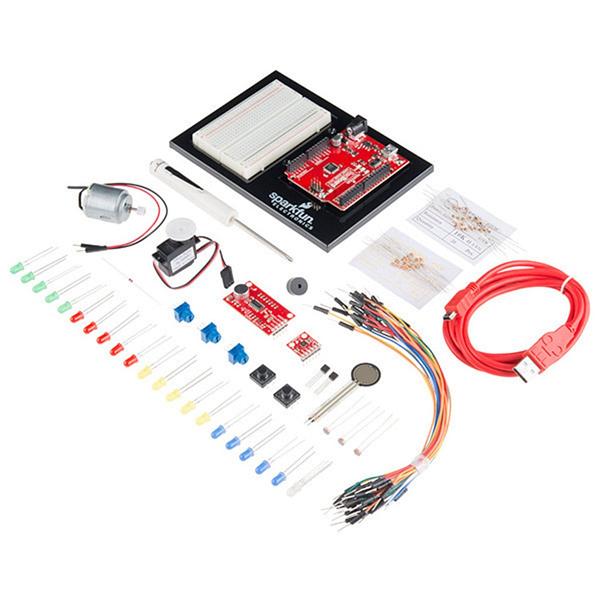
SparkFun Inventor's Kit for LabVIEW
Discontinued
The SparkFun Inventor’s Kit for LabVIEW is a great way to add real world connectivity, programming, and hardware incorporation to your LabVIEW projects. The SIK includes everything you need to complete 14 circuit experiments, created in conjunction with the LabVIEW MakerHub, that will teach you how to use the LabVIEW graphical programming environment, read sensors, drive motors, and more. Don’t worry, you won’t need any previous programming or electronics experience to use this kit.
The LabVIEW Home Bundle (download included in this kit) is a specially licensed version of the award-winning LabVIEW system design software targeted at home and maker use. The LabVIEW Home Bundle features a unique graphical programming environment for accelerated development and extensive support for a wide range of measurement hardware, I/O, and buses. Each bundle utilizes drag-and-drop interaction for quickly building graphical user interfaces with extensive signal processing, analysis, and math functionality (this includes added functionality for text-based math and control logic)!
The on-line SparkFun Inventor’s Kit for LabVIEW tutorials (in the Documents section below) contain step by step instructions of how to connect each circuit with the included parts. Thorough videos are provided and even includes troubleshooting tips if something goes wrong.
Note: The software is licensed for personal, non-commercial, non-industrial, non-academic purposes. Applications may be distributed only for non-commercial, non-industrial, non-academic purposes. Additionally, the LabVIEW Home Bundle software is for Windows only, be sure to check the system requirements before installing.
Circuit Examples:
- Circuit 1: Blink!
- Circuit 2: Controlling Multiple LEDs
- Circuit 3: Controlling LED Brightness
- Circuit 4: RGB LED
- Circuit 5: Push Button
- Circuit 6: Piezo Buzzer
- Circuit 7: Potentiometer
- Circuit 8: Photocell
- Circuit 9: TMP36 Temperature Sensor
- Circuit 10: Pressure Sensor
- Circuit 11: DC Motor
- Circuit 12: Servo
- Circuit 13: Sound Detector
- Circuit 14: MMA8452 Accelerometer
Kit Includes:
- SparkFun RedBoard
- LabVIEW Home Bundle Activation Code
- Arduino and Breadboard Holder
- White Solderless Breadboard
- SparkFun Mini Screwdriver
- SparkFun Sound Detector (with Headers)
- SparkFun Triple Axis Accelerometer Breakout - MMA8452Q (with Headers)
- 2N2222 Transistor
- 1N4148 Diode
- DC Motor with Gear
- Small Servo
- TMP36 Temp Sensor
- Force Sensitive Resistor 0.5"
- SparkFun USB Mini-B Cable - 6 Foot
- Jumper Wires
- Photocell
- Tri-color LED
- Red, Blue, Yellow, and Green LEDs
- 10K Trimpot
- Piezo Speaker
- Big 12mm Buttons
- 330 and 10K Resistors
Documents:
